Settings
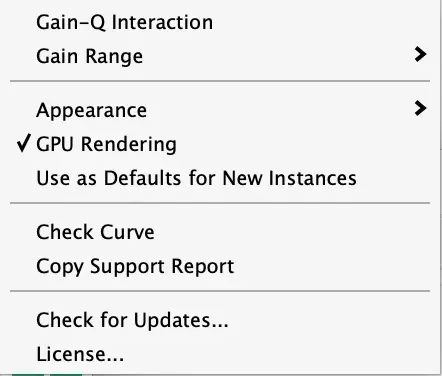
The gear at the right end of the top bar.
| Setting | What it does |
|---|---|
| Gain-Q Interaction | Makes Q follow gain the way analog parametric EQs do: the Q you set applies at 12 dB, smaller gains widen the band and larger gains narrow it. Off, every band is exactly the Q it shows. |
| Gain Range | The scale the curve is drawn on: ±6, ±12, or ±30 dB. |
| Appearance | Follows your Mac, or forces light or dark for a DAW whose theme disagrees. Applies to every instance. |
| GPU Rendering | Draws the display on the graphics chip. Turn it off if a host or machine misbehaves. |
| Use as Defaults for New Instances | Saves this instance’s display settings, gain range, window size, and Gain-Q Interaction as how every new Neutral EQ opens, on this Mac. |
| Check Curve | See Check Curve. |
| Copy Support Report | Copies a plain-text summary to paste into an email to support. |
| Check for Updates | Opens the Neutral EQ page, which tells you whether a newer version exists. The plugin itself never connects to the internet. |
| License | Enter or review your license key. |